Ask any tile distributor what eats up their sales team’s day, and you’ll hear a familiar list. Dealers calling to check stock. Dealers emailing for price confirmations. Dealers asking whether the next pallet will match the shade they sold last month. A B2B dealer portal moves all of that onto one screen your dealers can use at 10 p.m. on a Sunday, without waiting on anyone.
The catch? Tile and marble don’t behave like other wholesale products. Shade lots, caliber, slab photos, boxes versus square feet. A generic ordering tool trips over all of it. Below, we cover what a dealer portal should do for a tile or stone business, where rollouts go wrong, and whether you need one yet. For a working reference, see our B2B dealer management portal solution.
What Is a B2B Dealer Portal?
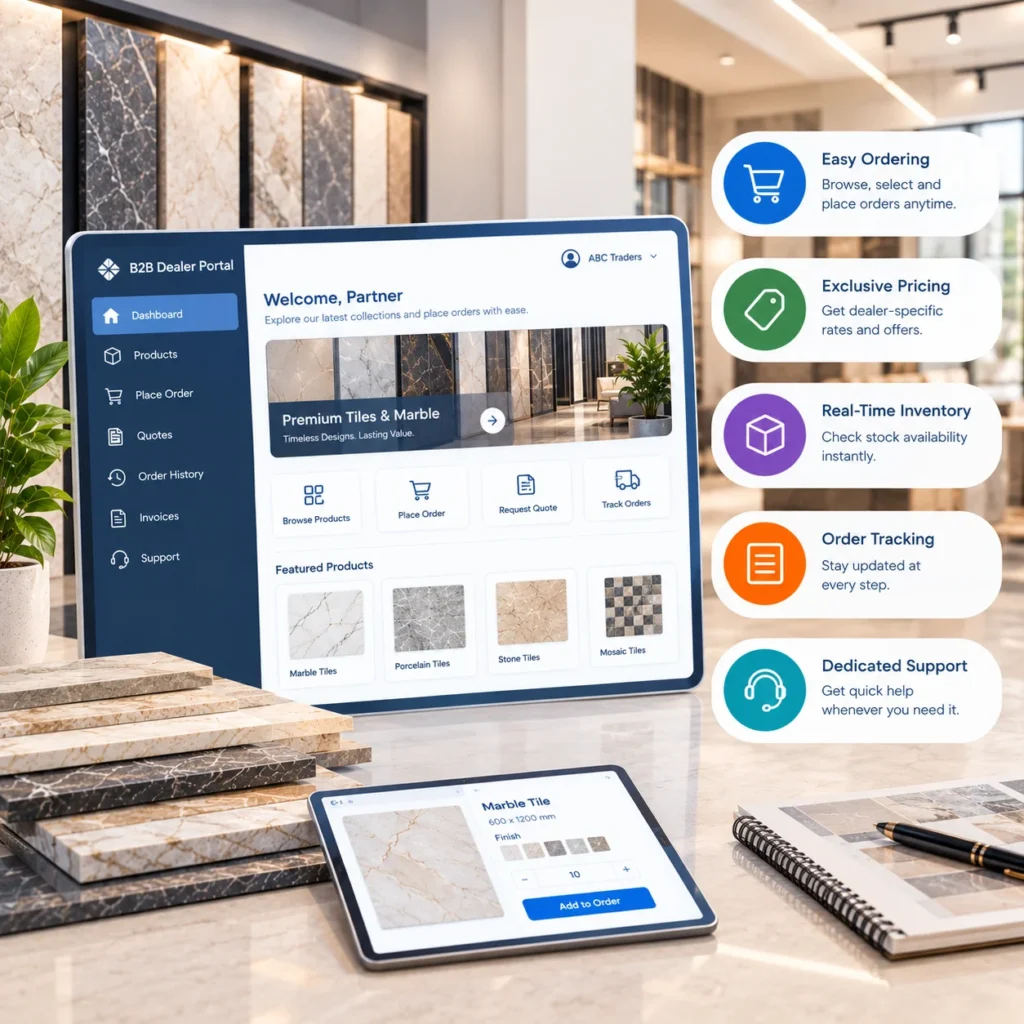
A B2B dealer portal is a private, login based platform where your dealers, contractors and retail partners place orders, check live inventory, see their own negotiated pricing, track shipments and pay invoices. Each account sees only its own data. Your team sets the rules once, and the portal applies them to every order.
Think of it as a sales desk that never closes and never mistypes a SKU.
Why Tile and Marble Need Something Different
Most B2B platforms were designed for products that are identical from one box to the next. Tile isn’t. Natural stone definitely isn’t.
Picture this. A dealer sells 1,800 square feet of matte porcelain to a homeowner. Three weeks later, the installer runs two boxes short. The dealer reorders, the warehouse ships from a newer production run, and the shade is visibly off. Now there’s a return, an annoyed installer and a dealer who trusts you a little less.
A tile aware portal heads that off by showing lot numbers at the point of order and letting dealers request a specific lot. That one feature saves more relationships than any discount.
Other details a generic platform tends to miss:
- Shade, tone and caliber codes, so mixed batches don’t reach the job site
- Dual units of measure, because dealers quote in square feet while the warehouse picks in boxes and pallets
- Sample and cut piece requests, which follow a different flow from pallet orders
Marble adds one more wrinkle. Every slab is unique. A dealer picking a heavily veined white marble for a kitchen island wants to see that exact slab, its thickness and finish, not a catalog stock image. Slab numbering with real photos is what separates a stone ready portal from a basic product list.
Signs You’ve Outgrown Phone and Email
Your inside sales team spends most mornings answering “do you have this in stock?” Three people edit the same price spreadsheet. Dealers learn an item is backordered after they’ve already promised a delivery date. Invoices go out late because someone has to rekey every order into the ERP.
Two or more of those sound familiar? Honestly, hiring another coordinator won’t fix it.
Buyer expectations are shifting too. Back in 2020, Gartner predicted that 80 percent of B2B sales interactions between suppliers and buyers would happen in digital channels by 2025. Make dealers call for everything, and some will drift to a supplier who doesn’t.
Core Features of a Tile Dealer Portal
These six capabilities form the working core of a dealer portal for tile and stone, based on what distributors actually use every day.
1. Self Service Ordering, Day or Night
Dealers place orders whenever they like, check their credit limit and available balance, and review payment history without calling anyone. Your reps stop being order takers. They get time back for key accounts, which is where they should’ve been all along.
2. Tiered Pricing and Volume Discounts
Showrooms, contractors and commercial builders rarely pay the same price. A good portal applies tier rules automatically by dealer classification and order volume.
- Each dealer sees only their own pricing
- Tier status stays visible, so dealers know what one more pallet unlocks
- You adjust rules centrally when costs or market conditions change
One caution. Don’t build 40 pricing tiers on day one. Start with the structure you already use.
3. Real Time Inventory Visibility
Dealers check stock by warehouse and expected restock dates before quoting a customer, which cuts cancellations and availability calls. For tile, the view should also show lots and shades, not just a box count. A strong inventory management solution underneath the portal is what makes that possible.
4. Order Tracking
Placed. Confirmed. Shipped. Delivered.
Dealers get automatic notifications at each stage and can pull proof of delivery themselves. They plan installs around accurate dates instead of hopeful ones.
5. Automated Invoicing and Payments
Invoices generate the moment an order is confirmed or shipped. Dealers pay online by card, ACH or purchase order, while automated reminders handle the awkward chasing on overdue accounts. Cash flow improves without anyone sending a nagging email.
6. Performance Analytics
This one works for both sides. Dealers see their own order history and trends. You see which accounts are growing, which are slipping, what sells in which season, and where a bit of targeted support could revive a quiet dealer.
Dealer Portal vs Generic B2B Ecommerce
Can a standard B2B store do the same job? Sometimes. Here’s how they usually compare:
| Need | Generic B2B Store | Tile Focused Dealer Portal |
| Shade lot and caliber tracking | Rarely supported | Built in |
| Square feet to box to pallet conversion | Manual workaround | Automatic |
| Unique slab photos for stone | Not supported | Per slab images and IDs |
| Dealer specific pricing tiers | Usually supported | Supported, with tier visibility |
| Credit limits and payment terms | Plugin or add on | Native |
| ERP sync for stock and pricing | Varies widely | Core requirement |
If your catalog is mostly setting materials and accessories, a general B2B ecommerce service may be all you need. Sell porcelain, ceramic or natural stone in volume, though, and the gaps in that table will show up quickly.
How a Portal Rollout Usually Works
Most successful launches follow four phases. Skipping the first is why many projects drag.
- Start with a dealer assessment that maps your network, pricing and workflows, plus every system the portal must talk to.
- Build role based access, pricing rules and automated order flows, with a live ERP connection so inventory and pricing stay in sync. Our ERP and CRM integration solution covers SAP, NetSuite and Epicor setups.
- Onboard dealers with short training and simple documentation, then watch adoption closely.
- Keep optimizing. Review usage monthly and test workflow changes.
Timelines vary a lot. A portal tied to one clean ERP moves far faster than one pulling data from three legacy systems and a shared spreadsheet.
Mistakes That Kill Dealer Adoption
A portal nobody logs into is just an expensive website. Watch for these.
Launching to everyone at once is the first trap. Start with 10 to 15 friendly accounts, fix what they complain about, then expand.
Letting reps take every order by phone is another. If the old way stays easier, dealers won’t switch. Faster dispatch on portal orders usually nudges them.
Hide lot details or delivery dates, and dealers will keep calling.
Mobile gets overlooked constantly. Plenty of contractors order from a job site or the cab of a truck.
And don’t skip the tools that help dealers sell. Our tile calculators and tools solution and product visualization solution give dealers confidence in front of their own customers, inside the same portal.
Is a Dealer Portal Worth It?
It depends on scale. A distributor with a dozen loyal dealers ordering twice a month may do fine with a tidy price list. Frankly, a full portal would be overkill there.
The math shifts once order entry eats hours of someone’s day, or your dealer count outgrows what a couple of reps can manage. Tiles IT Solutions reports that distributors using its portal have reduced order processing costs by up to 70 percent and raised average order value by around 40 percent. Your results will depend on dealer mix, catalog size and how clean your ERP data is.
Quick test: count a normal week’s dealer calls and emails, then check how many are simple stock, price or tracking questions. If it’s most of them, you have your answer.
Give Your Dealers a Better Way to Order
Dealers compare suppliers on how easy you are to buy from. A portal built around shade lots, slab inventory and dealer specific pricing gives them a reason to stay. Tell us about your dealer network, and we’ll show you what a tile ready portal could look like.
Frequently Asked Questions
1. What is a B2B dealer portal in the tile industry?
It’s a totally secure website where tile and stone dealers buy, see their pricing, see live stock by lot and shade, follow shipments and make invoice payments without calling the distributor.
2. How is a dealer portal different from a B2B ecommerce store?
A store will sell a catalog. The dealer portal also manages the relationship, with credit limits, negotiated tiers, lot selection, account history, and ERP synchronized inventory specific to the dealer.
3. Can a dealer portal handle marble slab inventory?
Yes, if it is a stone product. Find slab level IDs, actual slab photos, thickness and finish fields, and a slabbing hold for dealer.
4. Does a dealer portal connect to my ERP?
It would. Real time sync with your SAP, NetSuite, or Epicor system keeps inventory, prices, and invoices accurate avoiding rekeying.
5. How long do dealers take to adopt a new portal?
How quickly? It depends. Adoption will be fastest if you start small with a pilot group, keep refills simple, and make portal ordering as much more straightforward than phone ordering as possible.
6. Is a dealer portal secure?
Role based access a good built one will use role based access so each dealer can only view their own pricing, orders, and invoices. Internal teams will be given access rights to sections of the system that are relevant for their role.