A customer picks a slab at your yard. A salesperson promises it. Two days later, someone else sells it from the same lot. Nobody was careless. The register, the spreadsheet and the WhatsApp group simply disagreed.
That’s the usual way inventory management for granite dealers fails. Granite isn’t boxed stock. Every slab has its own movement, thickness, finish and block number, so the choice between manual and digital tracking matters more than it first looks. Below is an honest comparison of both approaches, where each one breaks, and when switching makes sense.
Quick answer: Manual inventory management tracks slabs with registers, spreadsheets and staff memory. Digital inventory management gives every slab its own record, usually with barcodes and photos, and updates stock live across yards and showrooms. Manual is fine for one yard with a small catalogue. Digital wins once you juggle multiple lots, multiple locations, or several quotes a day.
Why Granite Stock Is Harder to Track Than Most Products
A box of tiles lets you count units. A slab lets you count nothing until you know which slab.
Two pieces from the same block can look different enough to start a dispute. Because granite is a natural material, stock isn’t just a quantity. Each piece carries details that change its value and decide who it can be sold to:
- Block number and lot
- Colour name and grade
- Length, width and thickness
- Finish, such as polished, honed, leathered or flamed
- Bundle or crate number
- Yard location
- Status: available, reserved or sold
Photos matter too. Buyers choose with their eyes, not with a spec sheet.
How Manual Inventory Management Works Day to Day
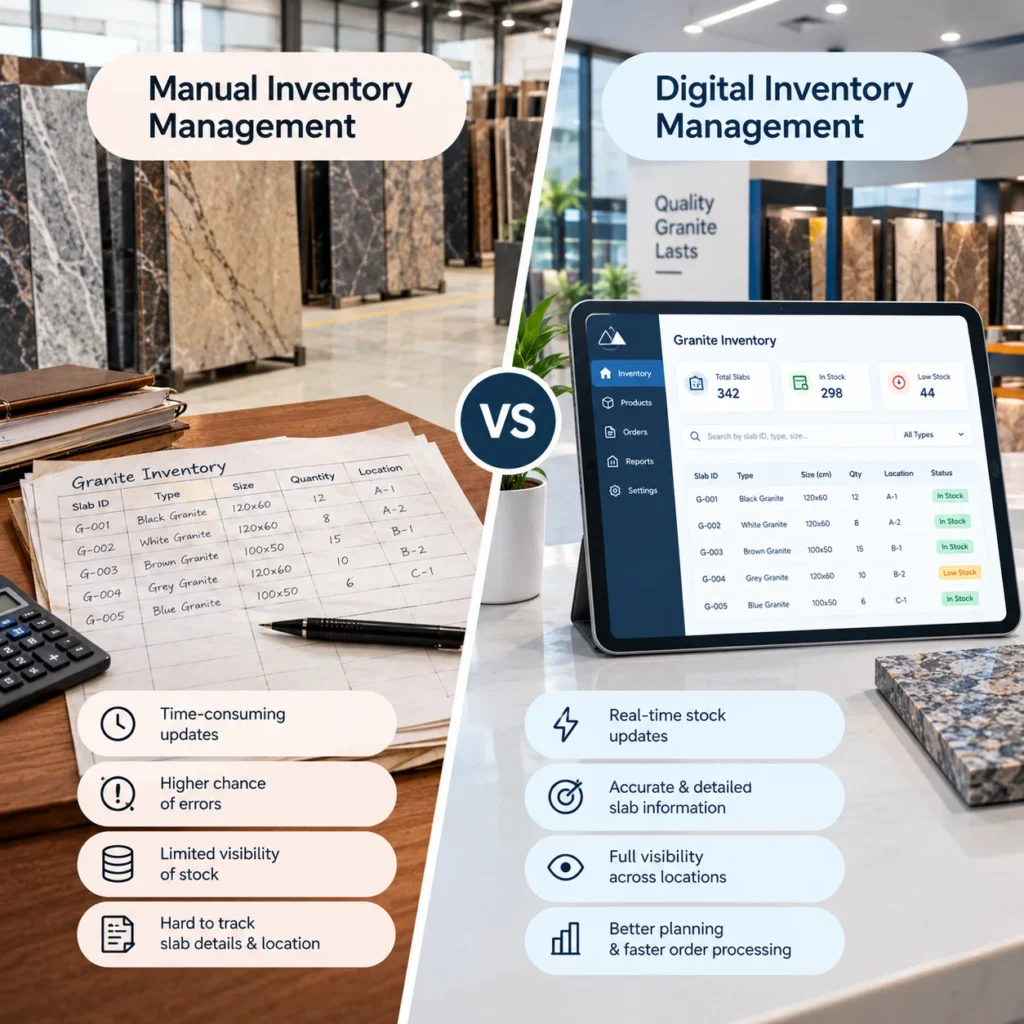
Most dealers start here, and there’s nothing wrong with that. A stock register, an Excel sheet, a whiteboard in the yard office, a WhatsApp group for updates. The yard supervisor knows where everything is because they’ve walked those rows for years.
Manual tracking has real strengths. It costs almost nothing, needs no training, and works when the internet doesn’t. For a small operation, that counts.
Where Manual Tracking Starts Costing You Money
Picture a showroom salesperson quoting slab 14 from a lot to a builder. The register says it’s available because it only gets updated at day’s end. By evening, that slab has been cut for another order. Now you’re apologising, offering a substitute with a visibly different vein, and hoping the builder doesn’t walk.
That story is common. These are the usual culprits:
- Double selling. Reservations live in messages and memory, so two people promise the same slab.
- Drifting counts. Spreadsheets get copied, renamed “final v3” and edited by two people at once. Within months, nobody trusts any of them.
- Shade matching by memory. Projects need slabs from the same block. When the person who remembers leaves, that knowledge leaves too.
- Dead stock. Slabs at the back of the yard that nobody remembers, quietly tying up cash.
- Slow quotes. Every quote starts with a phone call to the yard.
Not every failure is dramatic. Most of the damage is small, repeated and invisible.
What Digital Inventory Management Looks Like in a Granite Business
Digital doesn’t mean a bigger spreadsheet. It means each slab has its own record, and that record changes the moment something happens to the slab.
In practical terms, a good system gives you:
- Slab level records with block, lot, size, finish and photos
- Barcode or QR tags scanned at receiving, cutting, moving and dispatch
- Live availability across every yard and showroom
- Reservations that lock a slab so nobody else can promise it
- Ageing reports that show what’s been sitting too long
- Role based access, so a salesperson can view stock but not edit it
- Links to your accounting or ERP system
Worth asking about: how scanning works when yard connectivity is patchy. Many yards are open air, and Wi-Fi rarely reaches the back rows. A system that needs a constant connection will frustrate your team within a week.
Manual vs Digital Inventory Management: Side by Side
| Factor | Manual | Digital |
| Stock accuracy | Drifts over time, depends on end of day updates | Updates as slabs move |
| Slab reservations | Verbal or message based | Locked in the system, visible to all |
| Multiple yards or showrooms | Calls and forwarded sheets | One shared view |
| Quoting speed | Check with the yard first | Check live stock and photos instantly |
| Dead stock | Found during audits, if at all | Flagged by ageing reports |
| Upfront cost | Very low | Higher, plus setup and training |
| Dependence on key staff | High | Lower, data lives in the system |
| Audit trail | Weak | Every movement logged |
| Growth readiness | Strains past a few lots | Scales with your catalogue |
The Cost Question Nobody Likes to Discuss
Digital costs money upfront. Software, tags, barcode printers, training, and a few messy weeks of transition. Pretending otherwise wouldn’t be fair.
Manual has costs too, just harder to see. Think of one lost order because a promised slab was already sold. Add cash tied up in slabs nobody can find. Add staff hours spent calling the yard before every quote. None of it appears as a line item. It shows up as a slow leak.
Here’s a fair test. List last quarter’s problems that came from stock errors: wrong slabs, lost sales, rushed substitutions, unsold old stock. If the total feels bigger than the software budget, you already have your answer.
When Manual Is Still the Smarter Choice
Sometimes software is overkill. If you run a single yard, sell a small catalogue, and one or two people handle both sales and stock, a well kept spreadsheet is enough. Buying a system you won’t use properly is usually a waste. A disciplined register beats a badly adopted platform every time.
Signs It’s Time to Go Digital
Watch for these:
- You’ve sold the same slab twice. Once is enough.
- You have more than one yard or showroom.
- Salespeople phone the yard before every quote.
- You can’t say what’s been in stock for over a year without a full day of counting.
- Dealers or contractors keep asking for live availability.
- Your most reliable stock person would be very hard to replace.
Two or more of those? You’re past the point where manual is saving you money.
How to Move From Manual to Digital Without Chaos
Don’t switch everything at once.
Start by cleaning your data. Count what’s physically in the yard, then tag it. This is the dull part, and it decides whether the system can be trusted. Next, pilot with one yard or one product line rather than the whole business.
Run the old register alongside the new system for a short period, so mistakes get caught early. Train the yard team as seriously as the office team, because the people scanning slabs make or break accuracy. Once the basics are stable, add reporting, reorder alerts and dealer access.
Mistakes Dealers Make When Going Digital
Generic retail software is the biggest one. Most of it treats stock as units on a shelf and can’t handle slabs, blocks or lots. Others skip tagging discipline, so records and reality slowly split apart. Some ignore yard connectivity until launch day. And plenty never assign one person to own the data, so nobody fixes errors.
Pick tools built around how stone and tile businesses actually operate, and name an owner before go live.
Where Tiles IT Solutions Fits
Tiles IT Solutions builds inventory and wms for tile and building material businesses, so lots, shade variation and multiple warehouses are familiar problems for us. Granite has its own quirks, especially slab level tracking, and any good implementation starts by mapping how your yard really works.
If you also sell through dealers, a B2B dealer management portal can show them live stock and tiered pricing. And if your accounting already runs on another platform, our ERP and CRM integration work keeps everything connected.
Still tracking slabs in registers and spreadsheets? Book a consultation and we’ll look at your yard workflow, point out where stock errors are costing you, and show what a digital setup could look like for your business.
FAQs
1. What is inventory management for granite dealers?
It’s the process of tracking every slab, block and bundle you own: where it sits, what it measures, which finish it has, and whether it’s available, reserved or sold. It can be done manually or with software.
2. Is manual inventory management bad for granite dealers?
No. For a single yard with a small catalogue, it works fine. It struggles once you add locations, higher volumes or dealer access.
3. What should granite inventory software track?
At minimum: block and lot numbers, slab dimensions, thickness, finish, photos, location and reservation status. Ageing reports and accounting links are strong additions.
4. How long does it take to move from manual to digital inventory?
It depends on stock size and how many locations you run. Most of the time goes into counting and tagging existing slabs, not into the software itself.
5. Do digital systems work in yards with poor internet?
Some do, through offline scanning that syncs later. Always confirm this with any vendor before you commit.